
How it Works
This feature allows programs across all Inspirus solutions to send time-sensitive reminders through SMS in addition to email. If a recipient's reward goes unredeemed, they receive an SMS reminder 10 days after the initial day-of message until they claim it.
Adding SMS to 10 Day Non-Order Reminders improves reach and increases the likelihood that recipients engage with their experience and redeem their reward.
Learn more about SMS Messages for Day-of Celebrations.
Message Format
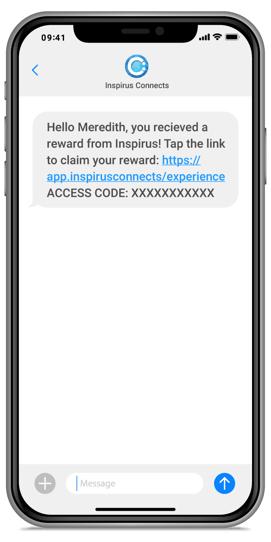
Customer Admins can customize the SMS message to reflect the customer's voice and brand.
User & Company Setup Process
SMS messaging is turned off by default and can only be enabled by the Inspirus Support Team. Please reach out to your Customer Success Director to request activation.
FAQs
- Do inactive users or recipients receive SMS messages?
-
Inactive users or recipients do not receive SMS messages.
-
- What information is required to send SMS messages to a recipient?
- SMS messages are sent when a valid phone number exists in the user's or recipient's data file.
- Is an email address required for SMS message delivery?
- SMS messages can still be sent even when no email address exists in the user's or recipient's data file.
- Are SMS messages resendable?
- SMS messages can be resent manually by the Inspirus Support Team.
- Can I customize the SMS message?
- Reach out to your Customer Success Director to customize the SMS message.
Questions? Submit a ticket to the Help Desk.