
Table of Contents
Overview
Ask Connects gives you answers about your recognition and rewards data without building a custom report or waiting on someone else to pull the numbers. Type your question in plain language and Ask Connects returns the answer on the spot.
Before you start
To use Ask Connects, you'll need:
-
Recognition & Rewards 360 (R&R 360) program
-
An administrator or reporting analyst with reporting access
Don't see Ask Connects under Reporting? Reach out to your Customer Success Director for assistance.
How it Works
- Select Reporting, then click Ask Connects.
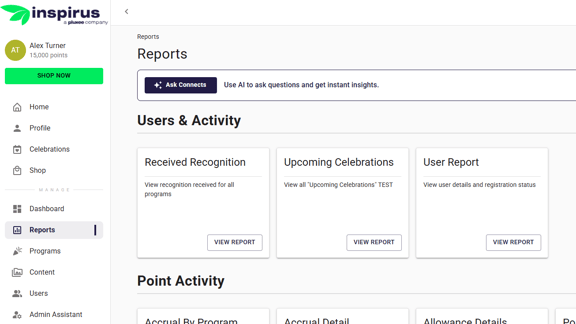
- Type your question the way you'd ask a coworker. For example, "How many recognitions were sent this quarter?" then hit Submit
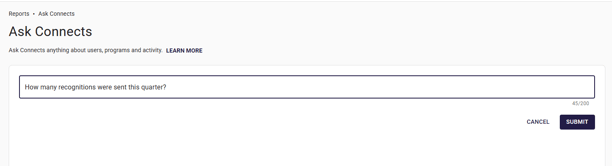
- Review the answer: Ask Connects shows your answer as a number or a data table pulled directly from your platform data. It gives you the result itself, not a written summary or a back and forth conversation.
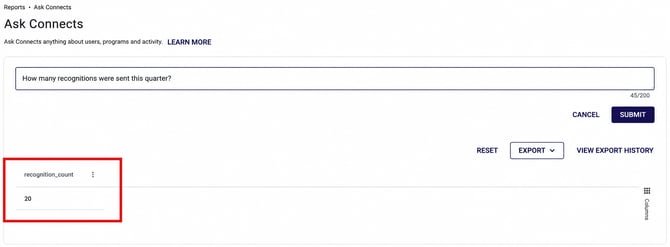
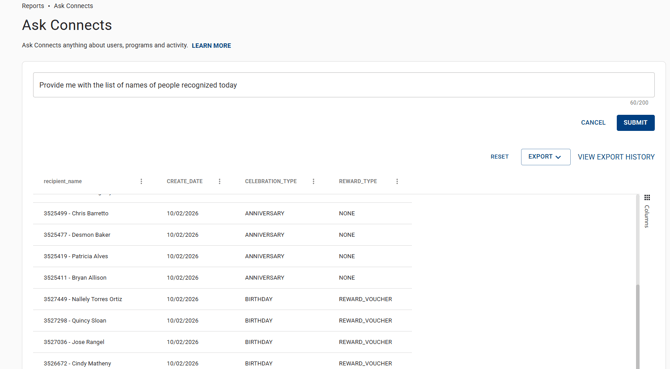
- To export your results, use the export option on the result screen.
Ask Connects answers based on the data currently in your platform, so a broad question may return a longer list or breakdown.
Inspirus's AI tool is designed for stand-alone questions but does not yet build on your previous question. Great functionality today with more on the way!
Example Questions You Can Ask
Type your question the way you'd normally ask it. There's no special phrasing to learn. Here are a few examples, grouped by what you're trying to find out:
Recognition activity
These questions show how much recognition is actually happening across your organization, so you can spot trends, momentum, or a slowdown before it turns into a bigger adoption problem.
- How many people received recognition this week, this month, or this quarter?
- How many recognitions were sent today? Yesterday?
- Show the number of recognitions sent each month since January.
Participation and adoption
These questions show who's actually engaging with recognition and who isn't, team by team or manager by manager, so you can see where the program is taking hold and where it needs a push.
- What percentage of active employees sent or received recognition in the last 30 days?
- What percentage of active employees sent at least one recognition this month?
- Which users show no recognition activity in the last 60 days?
- Which users show no recognition activity at all?
Points and redemption
These questions show whether the value your organization is issuing is actually reaching employees, since points that sit unredeemed are recognition that hasn't fully landed yet.
- What's the total unredeemed points balance for each department?
- What percentage of total points issued went unredeemed last quarter?
- What percentage of issued points have been redeemed year to date?
- How many people redeemed their points today or this week?
Tips for better answers:
- Be specific. Name a team, program, or date range instead of asking broadly.
- Ask one complete question at a time. Ask Connects doesn't build on your last question, so include everything you need up front.
- If nothing comes back, rephrase with more specific terms and try again.
FAQs
- What is Ask Connects?
- Ask Connects is an AI powered tool inside Reporting. Ask it a question in your own words and it finds the answer in your Connects data.
- What happens to my data when I use Ask Connects?
- Your data stays protected. Ask Connects turns your question into a report request, our system runs it, and the results come back directly to you. Your data is never seen, stored, or used for training by the AI model.
- Where do I find Ask Connects?
- Under Reporting, in the left navigation. No extra setup or separate section to open first.
- Who can use Ask Connects?
- Customer Admins, Customer Super Admins, and Customer Reporting Analysts. If you don't see it under Reporting, check with your Customer Success Director.
- Can I ask a follow up question?
- Not yet. Ask Connects doesn't build on a previous question, so ask each one as a new, complete question.
- Does the AI see or store my data?
- No. Ask Connects builds the report request, our system runs it, and the results come back directly to you. The AI never sees, stores, or trains on your data.
- What if Ask Connects doesn't return a result?
- Rephrase with more specific terms, such as business unit name, date range, or program name, and ask again.
- Is this available on my platform?
- Ask Connects is available for Recognition & Rewards 360 (R&R 360) customers only. If you would like to know if you are an R&R 360 customer or more information, reach out to your Customer Success Director.
Want to learn more about how Inspirus approaches AI? Visit Make Recognition Smarter with AI, Keep It Human to learn more about Ask Connects.
Questions? Submit a ticket to the Help Desk.